
How to Make Your First Deposit on Jai Club
Adding funds to your Jai Club wallet is a straightforward process that takes a few minutes. This guide covers every payment method, the deposit steps, and how to claim your welcome bonus.
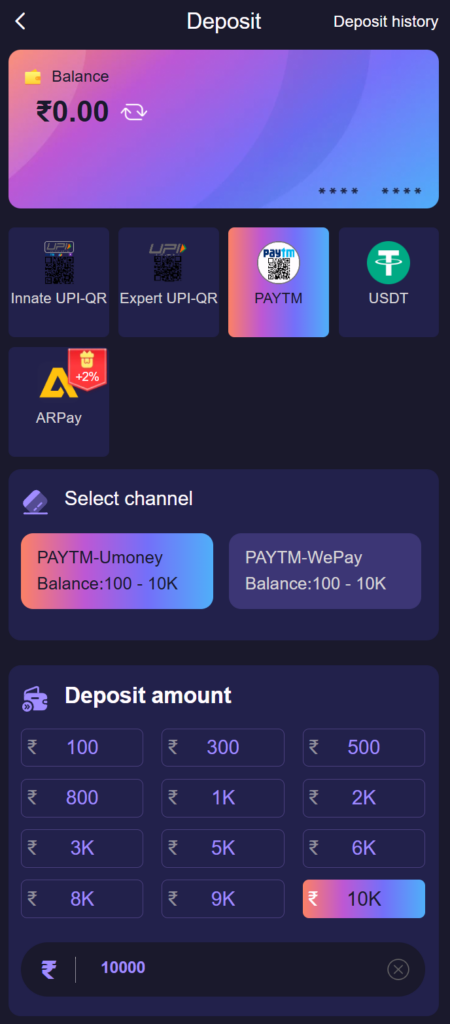
Before Your First Deposit
Jai Club lets you explore the platform layout and game sections before depositing. When you are ready to participate in paid rounds, adding funds to your wallet is the next step. Your wallet balance is shown in the dashboard at all times so you know exactly how much you have available.
Check the Promotions page before depositing. First-time depositors qualify for a welcome bonus that adds extra value to the initial top-up. The bonus terms specify the minimum deposit amount required to activate it.
Payment Methods Accepted on Jai Club
Jai Club supports the payment methods most commonly used in India. All methods are processed through secure payment gateways.
- UPI: The fastest option for most members. Use any UPI-enabled app such as Google Pay, PhonePe, or Paytm.
- Bank transfer: Direct transfer from your bank account to the Jai Club payment account.
- Digital wallets: Select wallets are accepted — check the current list on the deposit page as options may change.
How to Make a Deposit
- Log in to your Jai Club account.
- Go to the Wallet section from your dashboard.
- Tap "Deposit."
- Select your preferred payment method.
- Enter the amount you want to deposit. Check the minimum and maximum deposit limits shown on the page.
- Follow the payment instructions for your chosen method. For UPI, you will be shown a QR code or UPI ID to transfer to.
- Complete the payment on your banking app.
- Return to Jai Club. Your balance will update within a few minutes once the payment is confirmed.
How Long Does a Deposit Take?
UPI deposits are typically the fastest and usually reflect within one to five minutes. Bank transfers can take longer depending on your bank's processing time — sometimes up to a few hours during banking holidays.
If your deposit does not appear after 30 minutes and your banking app shows the payment as completed, contact Jai Club support with your transaction reference number. The team can trace the payment and credit it to your account.
Deposit Limits
Every payment method has a minimum and maximum deposit amount. These limits are shown on the deposit page when you select your payment method. They can vary based on your account's verification status — verified accounts generally have higher limits.
Setting a personal deposit limit in your account settings is a good way to stay within your intended budget. Once set, the platform will not allow deposits above the limit you specify.
Activating Your Welcome Bonus
Your welcome bonus is linked to your first deposit. The bonus is credited to your wallet after the deposit is confirmed, provided the deposit meets the minimum amount specified in the promotion terms. Read the wagering requirements attached to the bonus before using it, as bonus funds typically need to be played through a certain number of times before they can be withdrawn.