
How to Register on Jai Club: Step-by-Step Account Creation
Creating a Jai Club account takes only a few minutes and requires nothing more than a mobile number and a password. This guide walks you through every step from the registration page to your first login.
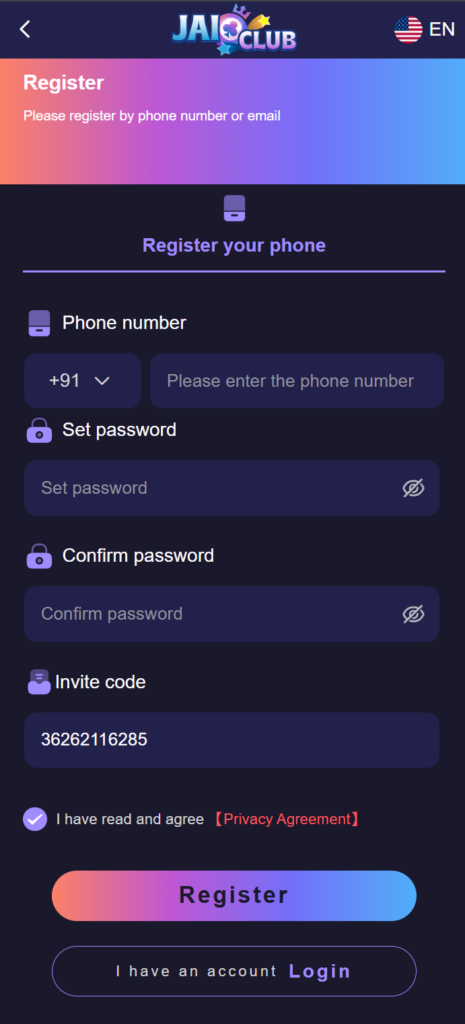
Getting Started with Registration
Jai Club makes account registration simple. The entire process takes under five minutes and only requires a mobile number, a password, and a moment to read the platform terms. You do not need to upload any documents to create your account — that comes later if you choose to verify for higher withdrawal limits.
Before you begin, make sure you have your mobile phone nearby. Your phone number will receive a one-time verification code during registration. Using the same number you intend to use for ongoing account management is the best approach since it is tied to your account recovery options.
Step-by-Step Registration Process
Follow these steps to create your Jai Club account.
- Open the Jai Club website or app on your device.
- Tap or click the "Register" button. It appears prominently on the homepage and the login screen.
- Enter your mobile number in the phone number field. This number becomes your account identifier.
- Create a strong password. Use a mix of letters, numbers, and symbols. Avoid passwords you use on other platforms.
- Enter a referral code if someone has shared one with you — this may unlock a bonus for both parties.
- Read the terms and conditions, then check the agreement box.
- Tap "Register" to submit your details.
- Enter the one-time verification code sent to your mobile number.
- Your account is now created. You will be logged in automatically or redirected to the login page.
What to Do After Registration
Once your account is active, explore the platform before making any deposit. Familiarize yourself with the layout by visiting the Games section, where all seven categories are listed. Check the Promotions page to see what welcome offers are currently available for new members.
Before making your first deposit, go to your Account Settings and confirm that all your details are correct. Your name and contact information should match the details you plan to use when setting up your payment method, as this can affect withdrawal processing.
Common Registration Issues and Fixes
Most registration problems are easy to resolve. Here are the common ones and how to handle them.
- Verification code not received: Check that your mobile number was entered correctly. Wait 60 seconds before requesting a new code.
- Phone number already registered: If your number is already linked to an account, use the password reset option to regain access.
- Password not accepted: The password must meet minimum length and complexity requirements shown on the registration page.
- Page not loading: Clear your browser cache or switch to a different network and try again.
Tips for a Secure Registration
The details you enter during registration are tied to your account permanently, so take a moment to be accurate. Use a mobile number that you own and have access to long-term. Avoid using a number belonging to someone else, as all account recovery and verification messages go to that number.
Write down or securely store your password after registration. Using a password manager is the safest option. Do not share your login credentials with anyone, including people who claim to offer assistance with your account.